- Computer Gripes
- Error code lookup
- 0x80070490
0x80070490 Error: Windows Update Element Not Found (Fix)
Error 0x80070490 means Windows can't find a component an update needs. Fix it with the troubleshooter, a cache reset, DISM and SFC, or a manual install.
Error 0x80070490 is the Windows code for ERROR_NOT_FOUND, shown in some dialogs as “Element not found.” Something the installer needed, such as a driver entry or a file in the component store, was not where Windows expected it. You see this error mostly in Windows Update, but code 0x80070490 also turns up in the Store, the Xbox app and the retired Mail app, with a different cause in each.
Where the 0x80070490 error code shows up
- In Windows Update, a cumulative, monthly or feature update fails, sometimes with the update stuck at “Install pending.”
- In the Store and the Xbox app, a download stops with the error code.
- In the old Mail and Calendar app, as “We couldn’t find your settings” when you add an account. Support for the app ended on December 31, 2024, so move to the new Outlook.
Likely causes
| Cause | What is going on | Typical context |
|---|---|---|
| Corrupted component store (CBS) | System files that updates install from are damaged or missing | Windows Update |
| Stuck or pending update | A driver operation from an earlier update never finished | Windows Update |
| Broken update cache | Bad files in SoftwareDistribution or catroot2 | Windows Update |
| Security software | A third-party antivirus blocks the update service | Windows Update, Store |
| Store cache or account glitch | Cached app data or sign-in state is out of sync | Microsoft Store, Xbox app |
Microsoft’s troubleshooting guide for Windows Update error 0x80070490 names failed driver operations as the main trigger.
How to fix error code 0x80070490: troubleshooter, repair, reset
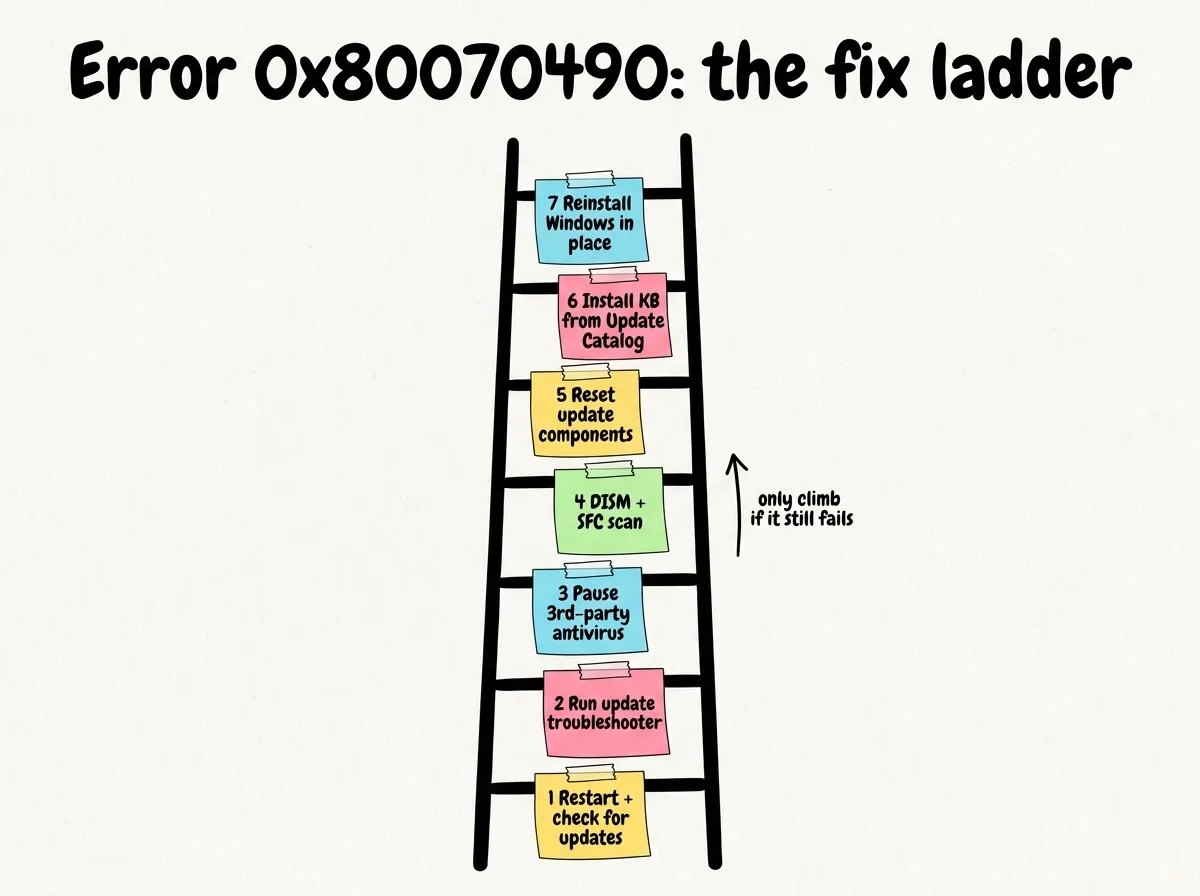
Steps 4 to 7 need an administrator account. Stop once the update installs.
- Restart and try again. Restart your computer, open Settings > Windows Update and click Check for updates. Sometimes that alone clears the issue.
- Run the Windows Update troubleshooter. On Windows 11 you can open the Get Help app and search for “Windows Update troubleshooter,” or go to Settings > System > Troubleshoot > Other troubleshooters and click Run next to Windows Update. On Windows 10 it sits under Update & Security > Troubleshoot > Additional troubleshooters.
- Pause third-party antivirus. Turn off real-time protection for a few minutes and retry. If that works, add an exception or switch to the built-in Microsoft Defender.
- Repair the component store with DISM and an SFC scan. Press the Windows key and type cmd, then choose Run as administrator to open the Command Prompt. Type
DISM /Online /Cleanup-Image /RestoreHealthand press Enter. When the process reaches 100%, run the System File Checker scan withsfc /scannow. Restart afterwards. - Reset Windows Update components. In the same window, run the following commands. Stop the services with
net stop wuauservandnet stop cryptsvc, rename the folders withren %systemroot%\SoftwareDistribution SoftwareDistribution.oldandren %systemroot%\System32\catroot2 catroot2.old, then runnet start cryptsvcandnet start wuauserv. Windows rebuilds both folders on the next check. - Install the update by hand. Look up the KB number from Update history in the Microsoft Update Catalog and run the matching package.
- Reinstall Windows in place. On Windows 11, go to Settings > System > Recovery and choose Reinstall now next to Fix problems using Windows Update.
Still failing with a new code? See the full guide to Windows Update errors or error 0x800f081f, another missing-component code.
Microsoft Store and Xbox app
When a download fails with 0x80070490, try these in order:
- Press Win + R, type
wsreset.exeand press Enter to clear the Store cache. - Check that date, time and region are correct.
- Sign out of the Store or Xbox app, restart, and sign back in.
What not to do
- Don’t delete registry keys under Component Based Servicing because a forum post said so. Microsoft’s guide asks for a full OS disk backup before that kind of change.
- Don’t reset the whole PC before trying DISM, SFC and the in-place reinstall, which keeps your files.
FAQ
Will DISM and SFC fix error code 0x80070490?
Often, when the component store is the problem. A stuck driver operation may still need step 5 or the in-place reinstall.
Is it safe to reset Windows Update components?
Yes. Renaming SoftwareDistribution and catroot2 only clears cached update data, which Windows downloads again.
Does this error still hit Windows 10?
It can. PCs enrolled in consumer Extended Security Updates get security updates until October 12, 2027, and the same fixes apply.
Did this fix it?
0 readers say this fixed it
Good. One gripe fewer on the wall.
Sorry. Tell us what you tried, or see if others have the same problem.