- Computer Gripes
- Error code lookup
- 0x800f0922
Error 0x800f0922: Windows Update Failed to Install (Fix)
Error 0x800f0922 means Windows started an update or feature install, hit a failed step and rolled it back. See the causes and the fixes, easiest first.
Error code 0x800f0922 means Windows downloaded an update or feature, started to install it and then hit a step it couldn’t finish, so it undid the changes. Microsoft’s name for it is CBS_E_INSTALLERS_FAILED: “processing advanced installers and generic commands failed.” The fix depends on where you saw the message.
Where you see it
The same number turns up in four places, and each one points to a different kind of problem:
- Windows Update. A cumulative update hangs near the end, says it’s undoing changes and lists the error in the update history.
- .NET Framework 3.5. Turning the feature on in Windows Features, or with DISM, fails. Microsoft notes that the error isn’t specific to .NET.
- Windows 10 upgrades. Setup stops, sometimes with “We couldn’t update system reserved partition.”
- Windows Server. Documented server cases involve a corrupted scheduled task or wrong folder permissions.
Likely causes
| Cause | Typical context | Go to step |
|---|---|---|
| Your computer can’t reach Microsoft’s servers (VPN, proxy, flaky connection) | Updates, upgrades | 1–2 |
| Not enough free space on drive C: | Updates | 3 |
| Corrupted system files | Updates, .NET 3.5 | 4 |
| The .NET 3.5 source folder can’t be read | .NET 3.5 | 5 |
| A full System Reserved partition | Windows 10 upgrades | 6 |
| A damaged Windows installation | Repeated failures | 7 |
How to fix error 0x800f0922 on Windows
You need an administrator account. Try the update again after each of the following methods.
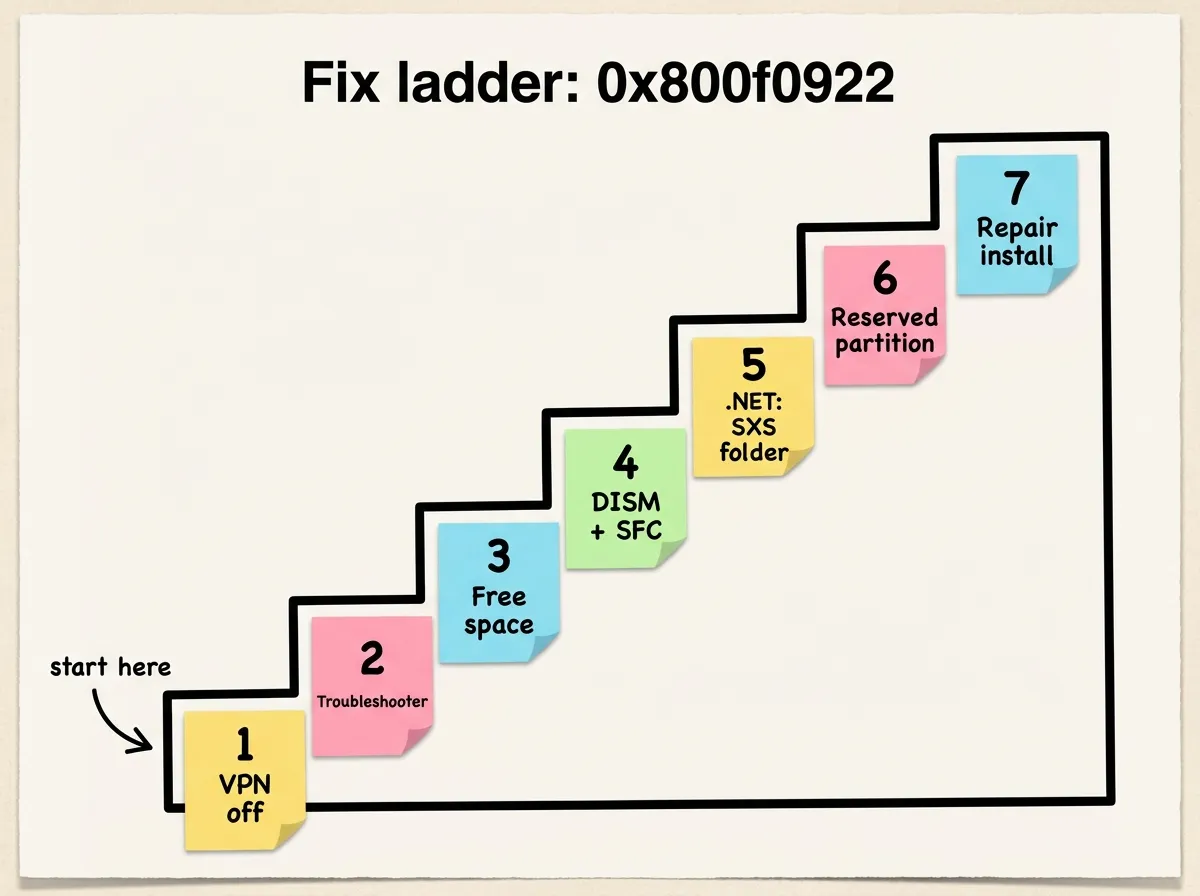
- Disconnect the VPN and restart. A work VPN comes up again and again in user reports about this error. Disconnect it, turn off any proxy you set up yourself, restart your computer and check for updates.
- Run the troubleshooter. On Windows 11, go to Settings > System > Troubleshoot > Other troubleshooters and select Run next to Windows Update. Current builds hand this over to the Get Help app. On Windows 10, the tool is under Update & Security > Troubleshoot.
- Free up space on C:. You may find enough disk space under Settings > System > Storage in Cleanup recommendations.
- Repair system files. Press the Windows key, type cmd, right-click Command Prompt and select Run as administrator. Type the following command and press Enter:
DISM /Online /Cleanup-Image /RestoreHealth. When it’s done, entersfc /scannowand restart. - For .NET Framework 3.5, check the source folder. Mount a Windows ISO that matches your version, right-click its sources\sxs folder and choose Properties > Security. Make sure Read & execute is allowed. Then type the command
DISM /Online /Enable-Feature /FeatureName:NetFx3 /All /Source:D:\sources\sxs /LimitAccess, with your drive letter in place of D:. On Windows 11 26H1 (build 28000) and later, .NET Framework 3.5 is no longer a Windows feature and comes from a standalone installer, so skip this step there. - Look at the System Reserved partition. Press Windows + X, choose Disk Management and check the small partition before C:. Microsoft once tied this error to that partition filling up, often with files from third-party security software. Resizing it is risky, so back up first or ask a technician.
- Do a repair install. On Windows 11, go to Settings > System > Recovery and select Reinstall now next to “Fix problems using Windows Update.” On Windows 10, run setup.exe from a matching ISO and keep your files and apps. Back up first either way.
Microsoft lists the error with other servicing failures in its table of common Windows Update errors. If you see a different number, our guide to fixing Windows Update errors covers the usual suspects.
What not to do
- Don’t delete scheduled tasks or registry keys because a forum post said so. Microsoft’s server fix for that only applies when the CBS.log shows that exact failure.
- Don’t resize or format partitions without a backup. One wrong click can stop your system from booting.
- Don’t switch updates off for good. Security fixes stop too. You can pause Windows Update for a while while you sort it out.
FAQ
Can a VPN cause error code 0x800f0922?
It can. Users often report that the install went through once they disconnected a work VPN, which may route traffic through a network that blocks Microsoft’s services.
Is it the same as 0x800f081f?
No. Error 0x800f081f means Windows couldn’t find the source files. Here the files arrived, but a step during installation failed. More are in our error code library.
Will a repair install delete my files?
No. “Reinstall now” and an in-place upgrade keep your files, apps and settings.
Did this fix it?
0 readers say this fixed it
Good. One gripe fewer on the wall.
Sorry. Tell us what you tried, or see if others have the same problem.