- Computer Gripes
- Error code lookup
- 0x80070422
Error 0x80070422: Windows Update Service Is Disabled
Error code 0x80070422 means a Windows service you need is disabled, often Windows Update. How to switch it back on, easiest fix first, plus Store cases.
Error code 0x80070422 means Windows tried to start a service and couldn’t, because that service is set to Disabled. Microsoft calls it ERROR_SERVICE_DISABLED: “The service cannot be started, either because it is disabled or because it has no enabled devices associated with it.” Usually a setting, a tool or a script switched it off, and you can fix the error by turning it back on.
Where the 0x80070422 error appears
The code shows up wherever Windows needs a service that has been turned off, so the fix depends on where you see it:
- Windows Update. “There were some problems installing updates” with code 0x80070422 under it. The Windows Update service (wuauserv) is off.
- Microsoft Store. Downloads or app updates fail with the same code, often because Windows Update or a Store-related service isn’t running.
- Windows Defender Firewall. Firewall settings can’t be changed when the firewall service is stopped.
Likely causes
| Cause | Where you notice it | Go to step |
|---|---|---|
| A one-off glitch after a restart or sign-in | Update, Store | 1 |
| Windows Update set to Disabled | Update, Store | 2 |
| A helper (BITS, Cryptographic Services) stopped | Update | 3 |
| An “update blocker” or tweak tool keeps turning things off | Update | 4 |
| Corrupted system files | Update | 5 |
| Firewall turned off at the service level | Firewall | 6 |
How to fix error 0x80070422, step by step
You need an administrator account. Start at the top and check for updates again after each step.
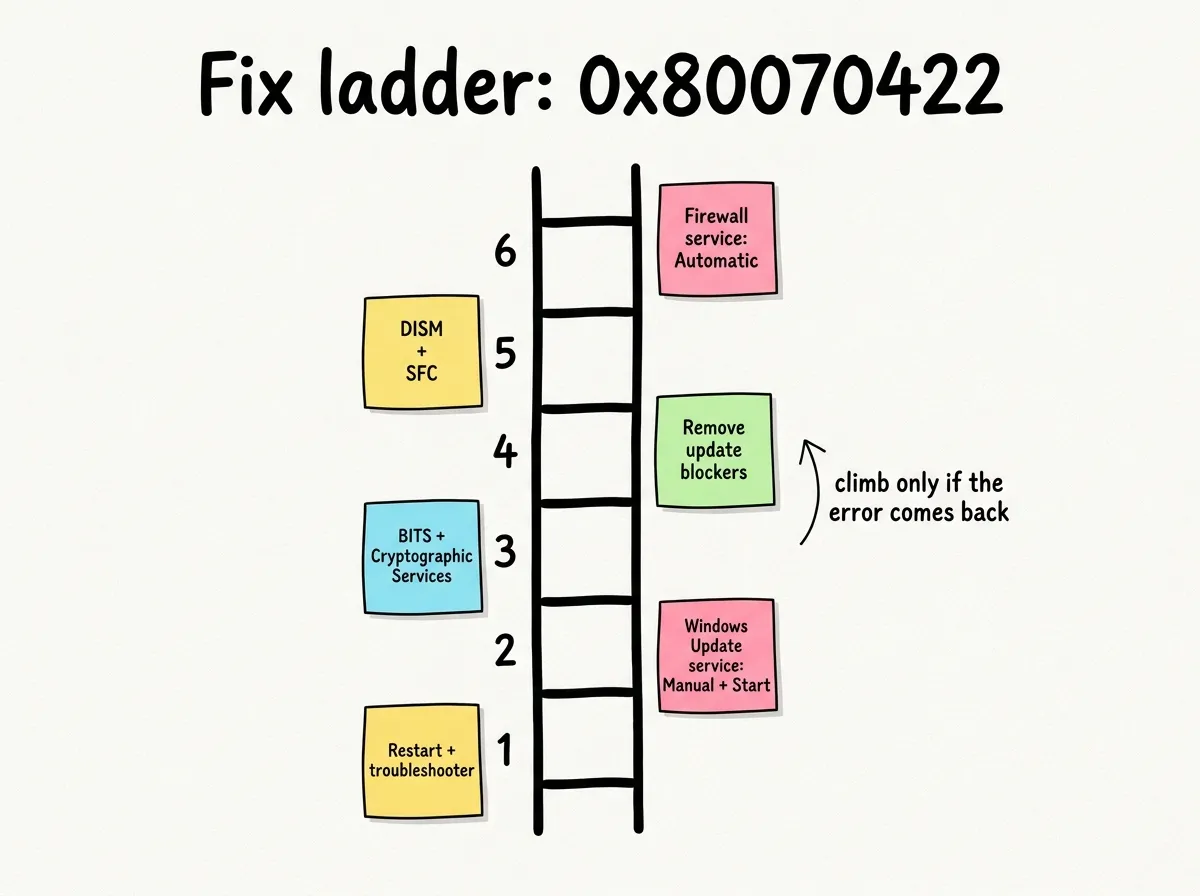
- Restart and run the Windows Update troubleshooter. Restart your computer, then try again. On Windows 11, open Settings > System > Troubleshoot > Other troubleshooters and click Run next to Windows Update. On current Windows 11 builds this opens the Get Help app. On Windows 10 the troubleshooter sits under Update & Security > Troubleshoot.
- Switch Windows Update back on. Press Windows + R, type
services.mscand press Enter. Find Windows Update in the list and double-click it. Change the startup type from Disabled to Manual (or Automatic), click Apply and then Start. Using the command line instead? Runsc config wuauserv start= demandand thennet start wuauservin an admin Command Prompt. - Check the helpers. In the same window, make sure Background Intelligent Transfer Service and Cryptographic Services aren’t disabled. Set them to Manual or Automatic and start them. For Store errors, also check Microsoft Store Install Service.
- Find what keeps switching them off. When the error comes back after a restart, a program is probably changing the setting again. Uninstall any tool you used to block or pause updates, and undo registry tweaks or scripts. A clean boot (
msconfig, hide Microsoft services, disable the rest) can help you find the culprit. - Repair system files. Open Command Prompt as administrator and run
DISM /Online /Cleanup-Image /RestoreHealth, thensfc /scannow. Restart and try the update one more time. - For the firewall version, start the firewall. In services.msc, open Windows Defender Firewall, set the startup type to Automatic and click Start. If another security suite manages the firewall, check it first.
Microsoft lists the underlying value 1058 (0x422) in its system error code reference. The “8007” prefix marks it as a standard Windows error. If a different code appears once Windows Update is running, our guide to fixing Windows Update errors covers the common ones.
What not to do
- Don’t leave Windows Update off to stop updates. You’ll keep getting this error, and Microsoft Store downloads may fail with it. If you just want fewer interruptions, pause or limit updates the supported way.
- Don’t start by disabling IPv6 or your antivirus. Some guides suggest you disable IPv6 first, but a switched-off service is the usual cause, and step 2 checks that in a minute.
- Don’t download “error fixer” programs. The Services window does the same job for free, and some of these tools bundle unwanted software.
FAQ
Is error 0x80070422 dangerous?
No. It only says a service is turned off. Some malware does stop update or security services, though, so if you didn’t change anything yourself, run a full scan once Windows Update is back.
Why does 0x80070422 come back after a restart?
Something re-applies the setting at startup: an update-blocking tool, a script or, on a work PC, a policy from IT. Remove the tool (step 4), or ask IT on a managed PC.
Do I still need Windows Update on Windows 10?
Yes, if you’re enrolled in Extended Security Updates. Consumer ESU for Windows 10 runs until October 12, 2027, and those patches arrive through Windows Update. More codes are in our error code library.
Did this fix it?
0 readers say this fixed it
Good. One gripe fewer on the wall.
Sorry. Tell us what you tried, or see if others have the same problem.