- Computer Gripes
- Error code lookup
- 0x80070057
Error 0x80070057: The Parameter Is Incorrect (Fix)
Error 0x80070057 means Windows got a value it can't use. How to fix it in Windows Update, Backup or when you format a drive, with the easiest steps first.
Error 0x80070057 means that a program or process handed Windows a value it can’t work with. Microsoft’s name for it is ERROR_INVALID_PARAMETER, and the error message that usually comes with it reads “The parameter is incorrect.” The same number shows up in several unrelated places, so how you fix the error depends on what you were doing when it appeared.
What the 0x80070057 error means
The last four digits, 0057, are system error 87, which Microsoft’s list of system error codes defines as “The parameter is incorrect.” The leading 0x8007 marks an operating system error that another component passed along. The number names the kind of failure. The situation tells you the cause.
| Where you see it | Likely cause | Start with |
|---|---|---|
| Windows Update or an update installation | A damaged update cache, corrupted system files | Steps 2 to 4 |
| Windows Backup and Restore | A decimal symbol other than a period, a flaky target disk | Step 1, then step 5 |
| Formatting or partitioning a disk | File system errors, a damaged partition, a failing hard drive | Step 5, then step 6 |
| Copying data to a USB stick | File system errors or bad sectors | Step 5 |
| Microsoft Store or app installs | Corrupted components of Windows | Step 4 |
How to fix error 0x80070057
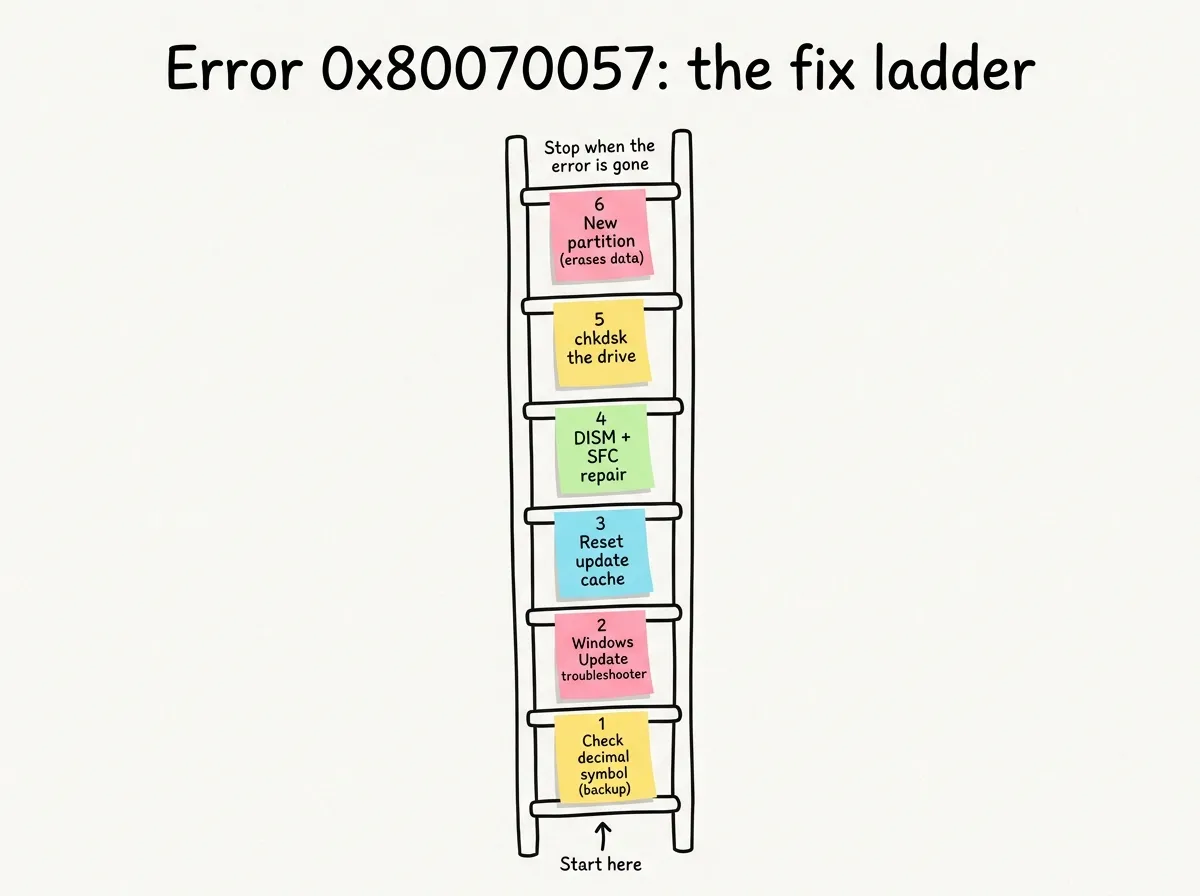
Restart the PC once and try the same task again. If the problem comes back, work through the following steps and stop as soon as it goes away. Steps 3 to 6 need an administrator account.
- Check the decimal symbol (backup errors only). Windows Backup and Restore may fail with this error when the decimal symbol is not a period, which can happen if your PC uses a non-US number format. Open Control Panel > Clock and Region > Region, select the Additional settings button, set Decimal symbol to a period and click OK twice.
- Run the Windows Update troubleshooter. In Windows 11, open Settings > System > Troubleshoot > Other troubleshooters and click Run next to Windows Update. Then look for updates again.
- Reset the update cache. Type cmd in the Start menu, select Run as administrator and enter the following commands one at a time:
net stop wuauserv,net stop bits,ren C:\Windows\SoftwareDistribution SoftwareDistribution.old,net start bits,net start wuauserv. The third command renames the folder where downloaded updates are kept. - Repair Windows with DISM and SFC. In the same window, enter
DISM /Online /Cleanup-Image /RestoreHealthand wait for 100%. Then run the System File Checker using the commandsfc /scannow. - Scan the disk for errors. Enter
chkdsk X: /f, replacing X with the letter of the drive that failed: the backup target, the USB stick or the disk you tried to format. If you pick the system drive, Windows asks whether to run the scan at the next restart. Type Y and reboot. - Create the partition another way. If formatting fails in File Explorer, right-click the Start button, select Disk Management, delete the broken partition and create a new one. This erases all data on that disk, so copy off anything you need first.
Still stuck on a failed update after step 4? Our guide on how to fix Windows Update errors covers the remaining options, including a manual installation from the Microsoft Update Catalog and a repair install.
What not to do
- Skip registry cleaners. Several “0x80070057 fix” tools promise one-click repairs, and the built-in troubleshooter, DISM and SFC already do what they claim to do.
- Stop repairing a hard drive that is dying. If the disk makes clicking sounds, or copies fail one after another, back up your data first. Repeated chkdsk runs on a failing disk can make recovery harder.
- Leave the registry alone when a forum post tells you to change it, unless you know which component has thrown the error and you have a backup.
FAQ
Is 0x80070057 a hard drive problem?
Sometimes. During copying, formatting or a backup, this error can point to file system errors or bad sectors. During the installation of an update it usually means a damaged download, and the disk itself is fine.
Does error 0x80070057 mean Windows is broken?
No. Windows is reporting that one process got a value it couldn’t use. Your documents and the rest of the system should be unaffected.
What if I see a similar code?
Close cousins are different errors with different causes. Error 0x80070002 means a file is missing, and you can look up the rest in our error code library.
Did this fix it?
0 readers say this fixed it
Good. One gripe fewer on the wall.
Sorry. Tell us what you tried, or see if others have the same problem.