- Computer Gripes
- Error code lookup
- 0x80073712
Error 0x80073712: Windows Update Component Store Fix
Error 0x80073712 means the Windows component store is corrupt and updates stop. Here are the causes and the solution order, from DISM to an in-place upgrade.
Error 0x80073712 means Windows can’t trust its own spare parts. The component store (the WinSxS folder, where your system keeps its building blocks plus the data that tracks them) is in an inconsistent state. Microsoft calls the code ERROR_SXS_COMPONENT_STORE_CORRUPT. Until it is repaired, the process stops at the same point on every retry.
Where you see it
- Windows Update on Windows 10 and 11: a cumulative or .NET Framework update fails with “Install error – 0x80073712”, often partway through.
- Feature upgrades: the move to a new version rolls back.
- DISM: a scan can end with “Error: 14098 The component store has been corrupted”. 14098 is the same code written in decimal.
- Windows Server: adding a role or feature fails, and the CBS log says the store could not be loaded.
Several codes look alike but mean something else. 0x80073701 means one piece is missing, and 0x800f081f means DISM found no source for the corrupted files. Check all eight digits before you use a guide.
Likely causes
| Cause | What usually happened |
|---|---|
| Interrupted servicing | A power cut or forced restart during an update |
| Damaged system files | Disk errors or a crash broke files in WinSxS |
| Incomplete downloads | The cached update package is missing pieces |
| “Cleaner” tools | Software that trimmed WinSxS or deleted servicing data |
The solution, step by step
Use the steps in this order and stop as soon as the update goes through.
- Restart the PC and try again. Then open Settings > System > Troubleshoot > Other troubleshooters and run the Windows Update troubleshooter. On current Windows 11 builds it opens the Get Help app.
- Clear the cached downloads. Open Disk Cleanup, click Clean up system files, tick Windows Update Cleanup and click OK. Windows then fetches the latest version of the package from scratch.
- Open the command prompt as administrator: press the Windows key, type cmd, right-click Command Prompt and select Run as administrator. Type the following command and press Enter:
DISM.exe /Online /Cleanup-Image /RestoreHealth. When it finishes, runsfc /scannow, restart and check for updates again. - If that scan fails because it can’t fetch good copies, give it a source. Mount an ISO of your exact Windows version (double-click it, say it becomes drive D:) and enter the following command:
DISM.exe /Online /Cleanup-Image /RestoreHealth /Source:WIM:D:\sources\install.wim:1 /LimitAccess. Change the drive letter and image index to match. - Still failing? Open C:\Windows\Logs\CBS\CBS.log and search for “Corrupt” near the end. The build number in those lines tells you which package holds the good files, and you can download it from the Microsoft Update Catalog.
- In-place upgrade. On Windows 11, go to Settings > System > Recovery and choose “Fix problems using Windows Update”. On Windows 10, run the Media Creation Tool, pick “Upgrade this PC now” and keep personal files and apps.
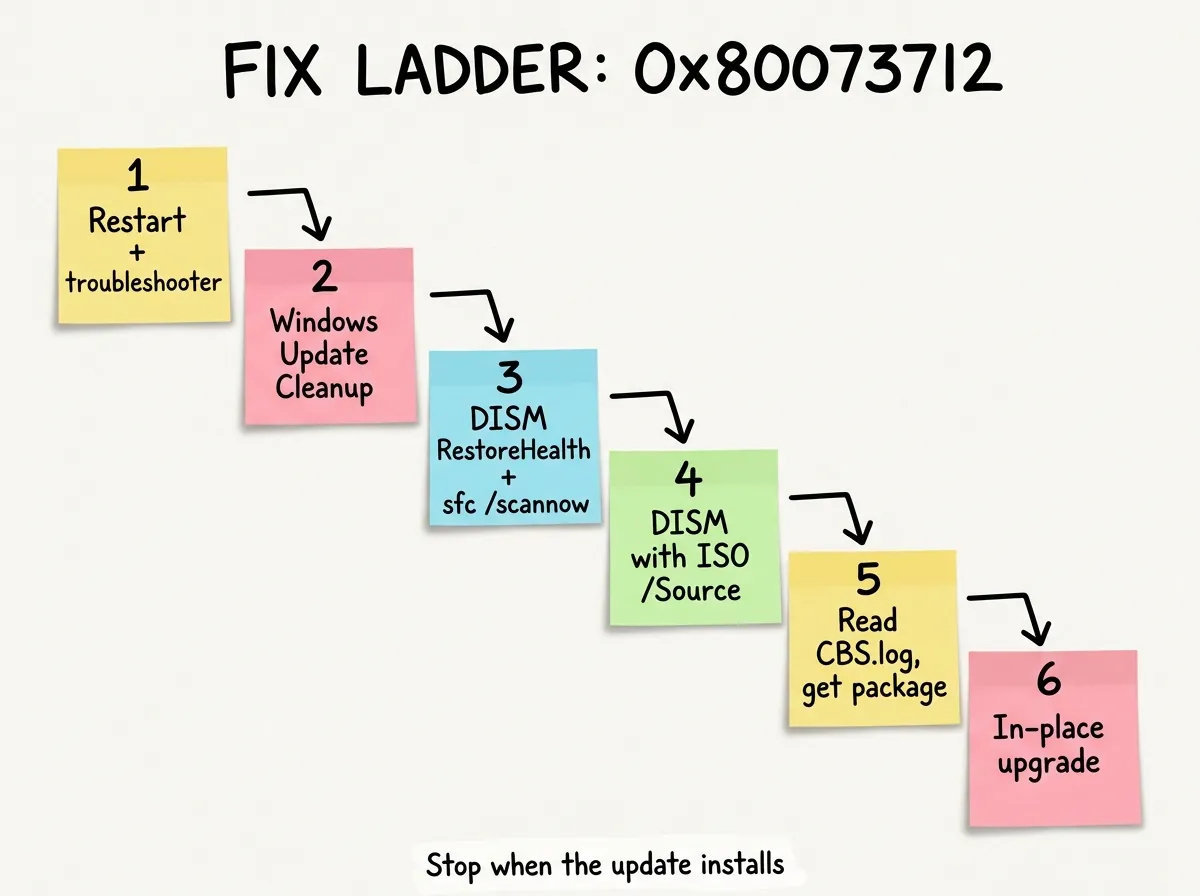
Step 5 is the fiddly part. Microsoft’s article on fixing Windows Update corruptions lists 0x80073712 in its error table and shows how to read the CBS log and match build numbers to KB packages. If the command at step 4 stops with a missing source, our 0x800f081f guide covers that case.
On Windows 10, keep in mind that new patches after October 2025 only arrive through Extended Security Updates, which for home users run until October 12, 2027.
What not to do
- Don’t delete or compress the WinSxS folder by hand. That makes the damage worse.
- Skip registry cleaners and downloaded “update fixer” tools. Some of them delete exactly the data this code complains about.
- Don’t reset the PC first. An in-place upgrade keeps your apps and data.
For other failures, see our Windows Update troubleshooting guide and the error code library.
FAQ
What does 0x80073712 mean?
The store Windows uses for servicing is corrupt, so updates can’t be applied until it is repaired.
Does DISM fix it?
Often, yes. If /RestoreHealth can’t download good copies, an ISO as the source or an in-place upgrade usually finishes the job.
Will I lose my files?
No. None of these steps deletes personal data, and the in-place upgrade keeps apps and settings. A backup before step 6 is still a good idea.
Did this fix it?
0 readers say this fixed it
Good. One gripe fewer on the wall.
Sorry. Tell us what you tried, or see if others have the same problem.